Using Multiple Layouts
General
Depending on your service package, Hotelmedia News gives you as many layouts in A4, A5 or A4 long as you like, which you can use for your different publications. For example:
- your daily hotel newspaper or guest newspaper
- seasonal versions of your hotel newspaper
- weekly programme
- spa newspaper
- staff newspaper
- any other printed matter
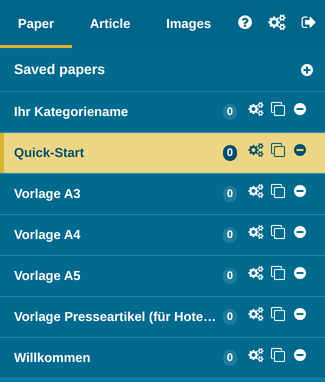
All layouts can be filled independently of each other with their own articles, article recurrences, different nameplate images etc.
But individual articles can also be used in different layouts at the same time; these articles are linked to each other.
CAUTION: If the content of the articles is changed, the change takes effect everywhere the article is used. More on this below.
Creating a New A4, A5 or A4 Long Layout Category
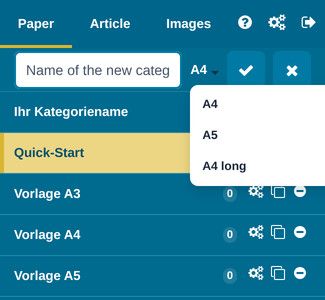
Click the plus icon to the right of “Paper – Saved papers”, enter a suitable name for your new category and choose the format you want, A4, A5 or A4 long, from the drop-down menu. Confirm your choice.
The A4 long format consists of four narrow portrait pages that are printed together on one A4 sheet and folded.
Activating and editing the new category
Click the category name, and Hotelmedia News loads the new layout for this category.
Now you can start creating your new edition:
—> set a new nameplate image
—> create new articles with the appropriate article recurrences
—> use existing articles from “Article – Own articles”
If necessary, create a new article category in “Own articles” so that you keep track later.
IMPORTANT: If you use an existing article that is already in use in the standard edition or another category, changes to the article always affect ALL editions in which the article appears.
Using the Same Articles in Different Layouts
If you use an article in several edition categories, these articles are linked to each other, and changes to the article in one edition also take effect in other editions.
What does this mean for me?
Let’s say you have a “Weekly programme” category, in which you show an overview of your daily activities for the week, as well as a daily hotel newspaper.
Now you use, for example, the article “Monday” from the weekly programme in the Monday edition of your hotel newspaper too.
If you change the article in your weekly programme, the change is carried over automatically to the Monday edition of your hotel newspaper. This saves you work and avoids an annoying source of errors.
There are many ways to make good use of the same articles. But please always bear in mind that content changes affect all of these articles.
Why can’t I change the size of the article?
If an article is used in several layouts, its size can no longer be changed, because this change would affect all layouts and might create conflicts with other articles.
TIP: Plan your different editions so that the article sizes can stay the same, or use different articles (which you then also have to change individually, if necessary)