Using Article Recurrence
Article recurrence is a central tool in Hotelmedia News. It determines on which day an article appears automatically in your editions. It is always based on the date or the weekday of the edition.
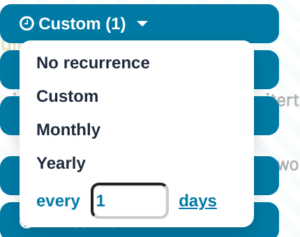
You can set a custom recurrence, where you decide yourself at what interval the article should appear again. With a recurrence rate of 1 the article appears daily, with a recurrence rate of 7 weekly. Any interval between 1 and 365 days is possible.
Monthly and yearly recurrences are also available. In this case the article is shown automatically on the selected day.
Example:
If an article is created on 24 December with a yearly recurrence, it appears automatically in your edition every year at Christmas on 24 December.
Setting the Recurrence Rate
Click “Edit” and set the cycle you want in the article menu under “Set recurrence”: “No recurrence”, “Custom” (every 1 to 365 days), “Monthly” or “Yearly”. Save the article.
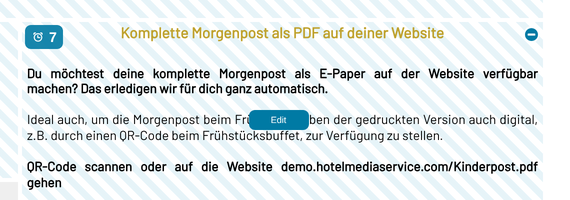
In the layout, the article is now shown with a blue striped background. When you move the mouse pointer over the article, a clock icon with a number appears in the top left corner of the article, showing the recurrence cycle at a glance.
Tip for structuring your layout
First decide where articles that recur daily, such as the weather, logo, nameplate images or similar content, should go. Then place these articles with a daily article recurrence.
That way this area is filled automatically in every future edition.
Daily article recurrence – “every 1 days”
This setting is particularly suitable for articles that appear in the same position every day and whose content does not change constantly. Examples are welcome texts, opening hours or general information.
It is also suitable for content such as the weather or sudoku, whose content is updated automatically by the software.
Weekly article recurrence – “every 7 days”
This setting is ideal for events that recur weekly, for example daily activities, a welcome evening or other fixed weekly programmes.
It can also be used for articles that are in the same position every day but whose content changes daily – for example the dinner menu.
Individual article recurrence – between 1 and 365 days
Decide individually at what rhythm the article should appear. For example 14 for a recurrence every two weeks.
Monthly and yearly article recurrence
This setting is suitable for articles that should appear on a particular day of the month or day of the year.
Important
The monthly or yearly recurrence takes priority and overrides other article recurrences.
Ending an article recurrence
If you delete an article with an article recurrence from the layout, it is only removed from the current edition – the article recurrence remains. To end the recurrence, first set “No recurrence” in the article menu and save the article.