Birthday Editions & Co – Changing the Nameplate
General
At your first login you created your own nameplate by dragging it from “Own articles – Insert nameplate” into the layout.
To personalise your hotel newspaper, you can use as many different nameplates as you like, e.g. for a special birthday edition.
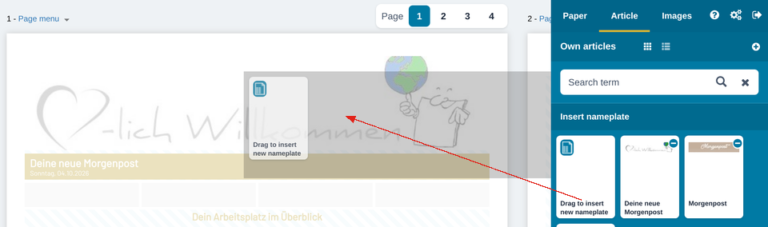
Creating a New Nameplate
To insert a new nameplate, first delete the existing nameplate —> click the nameplate image and choose “Delete Block” (minus icon).
IMPORTANT – if you use an article recurrence, first set it to “No recurrence” in the article menu!
In the “Article” section, choose a new nameplate image “Own articles —> Insert nameplate —> Drag to insert new nameplate” and drag it to the position you want.
By clicking the image icon in the article field, you either upload a new image, or you choose an image from your image folder and drag it onto the grey image area.
Tip: The image area has a ratio of 21 x 4.3 cm in an A4 layout and 15.6 x 4.3 cm in an A5 layout! Alternatively, crop the image to the section you want in the “Crop Image” window.

The title of your newspaper can be customised by clicking the text. If you change it, do not forget to adapt the title to the respective language in multilingual editions too!
Now set the article recurrence you want.
Changing the Edition Name in the Nameplate
The newspaper name can be changed simply by clicking the existing text.
Do not forget to change the name in the foreign-language editions too!
New nameplate images are saved automatically under “Own articles – Insert nameplate” and can be reused in future editions!
Creating a Birthday Edition
With individual nameplates you can quickly and easily create special editions of your current hotel newspaper, e.g. a birthday or anniversary edition for a special guest.
How does it work?
Once you have finished and saved your daily edition, make a copy of it under “Paper – Saved papers” by clicking “Copy edition”. An exact copy of your edition is created.
Open the copied edition and replace the current nameplate, e.g. with a special birthday nameplate.
Change the name, e.g. to “Birthday newspaper for Mr XY”
Save the edition and create a new PDF. That is how easily you can personalise your hotel newspaper.